手動註冊window service程式
2015年10月6日 星期二
執行程式如下:
加入service方式
c:\Windows\Microsoft.NET\Framework\v4.0.30319\InstallUtil.exe C:\xxx\xxx.exe(執行程式名稱)
刪除service
sc delete service名稱
Read more...
查詢指令
csc /help
編譯cs檔方式
C:\Windows\Microsoft.NET\Framework\v4.0.30319>csc /t:exe /out:c:\helloworld\hell
oworld.exe c:\helloworld\helloworld.cs
public class HelloWorld
{
public static void Main(string[] args)
{
System.Console.WriteLine("Hello World!");
System.Console.ReadLine();
}
}
今天遇到使用Guid.NewGuid在IE8的奇怪問題
如果在網站列按Enter則會發生,但按F5重新整理確不會
最後確定是瀏覽器Cache問題造成的,我來重現一下實際的情況
測試程式如下:
protected void Page_Load(object sender, EventArgs e)
{
    Response.Write(Guid.NewGuid().ToString() );
}
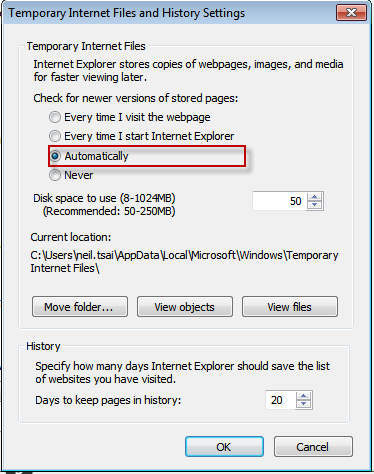


protected void Page_Load(object sender, EventArgs e)
{
    Response.Cache.SetNoStore(); //清除Cache
    Response.Write(Guid.NewGuid().ToString() );
}
Read more...
public class SiteMapMenu : HierarchicalDataBoundControl
{
  public void RecursiveCreateChildControls(IHierarchicalEnumerable dataItems, bool isRecursiveCall)
  {
      //抓取自訂屬性
      System.Web.SiteMapNode node = dataItem.Item as System.Web.SiteMapNode;
      bool customerTag = node["coustomerFlag"];

      if(customerTag) continue;
  }

}

//Web.sitemap
(CreationStatus)Enum.Parse(typeof(CreationStatus), dataReader["CreationStatus"].ToString());
private static ListRead more...AddECEventLog(IDataReader dataReader) { var ecEventLogList = new List (); while (dataReader.Read()) { var ecEventLog = new ECEventLog(); ecEventLog.ECEventId = dataReader["ECEventId"] == DBNull.Value ? null : dataReader["ECEventId"].ToString(); ecEventLog.CreationStatus = (CreationStatus)Enum.Parse(typeof(CreationStatus), dataReader["CreationStatus"].ToString()); ecEventLogList.Add(ecEventLog); } return ecEventLogList; }
Func & Action是委派用法,差別在於Func:有回傳值,Action:不需要回傳值
首先來看一下委派基本用法
    //委派基本定義
    public delegate string BaseDeletegate(string source);

    public static class ServiceBase
    {
        public static string Execute(BaseDeletegate action, string source)
        {
            string value = action.Invoke(source);
            return value;
        }
    }

    //呼叫委派用法
    public static void runBaseDeletegate()
    {
        BaseDeletegate action = ResponseMsg;
        string result = ServiceBase.Execute(action, "Neil");
        Console.WriteLine(result);
        Console.ReadLine();
    }

    //執行的方法
    public static string ResponseMsg(string str)
    {
        return "Hello:" + str;
    }
執行結果
    //Func定義
    public static string ExecuteFunc(Func action)
    {
        return action();  //有回傳值
    }

    //呼叫Func方法
    public static void runBaseFunc()
    {
        string result = ServiceBase.ExecuteFunc(() => {
            return ResponseMsg("FuncNeil");
        });
        Console.WriteLine(result);
        Console.ReadLine();
    }

    //執行的方法
    public static string ResponseMsg(string str)
    {
        return "Hello:" + str;
    }

    //Action定義
    public static void ExecuteAction(Action action)
    {
        action(); //沒有回傳值
    }

    //呼叫Action方法
    public static void runBaseAction()
    {
        ServiceBase.ExecuteAction(() => {
            ActionResopnseMsg("ActionNeil");
        });
    }

    //執行的方法
    public static void ActionResopnseMsg(string str)
    {
        Console.WriteLine("Hello:" + str);
        Console.ReadLine();
    }

寫了這麼久的程式,都沒特別注意到這二者的差別
簡單來說throw 會多一項原始執行錯誤行號。
throw ex resets the stack trace (so your errors would appear to originate from HandleException)throw doesn't - the original offender would be preserved.
 static void Main(string[] args) {
  try {
   ThrowException1(); // line 19
  } catch (Exception x) {
   Console.WriteLine("Exception 1:");
   Console.WriteLine(x.StackTrace);
  }
  try {
   ThrowException2(); // line 25
  } catch (Exception x) {
   Console.WriteLine("Exception 2:");
   Console.WriteLine(x.StackTrace);
  }
 }

 private static void ThrowException1() {
  try {
   DivByZero(); // line 34
  } catch {
   throw; // line 36
  }
 }
 private static void ThrowException2() {
  try {
   DivByZero(); // line 41
  } catch (Exception ex) {
   throw ex; // line 43
  }
 }

 private static void DivByZero() {
  int x = 0;
  int y = 1 / x; // line 49
 }


 發表文章
所有留言


