用Oracle 使用TransactionScope錯誤訊息

2016年5月5日 星期四


在使用TransactionScope,要特別注意是否有安裝以下元件,不然會有以下錯誤訊息:
Exception type: System.InvalidOperationException
Message: The Promote method returned an invalid value for the distributed transaction.

需要檢查


原來是Oracle要安裝OracleMTSRecoveryService才可以使用。

Read more...

dateObj.getYear() vs dateObj.getFullYear()

2016年3月10日 星期四


今天遇到一個特別的情況,所以筆記一下

用Javascript的.getYear(),取出得到的是115

原來因為2000年的問題,getYear()只會回傳二位數,所以現在早就不能用了,要改用getFullYear()


參考來源:https://developer.mozilla.org/en-US/docs/Web/JavaScript/Reference/Global_Objects/Date/getYear

Read more...

利用swagger建立互動式API文件

2015年12月28日 星期一

最近在寫Web API程式,通常都會搭配Help Page來使用,可以建立文件方便查詢,但是如果要測試API,則都會使用Fiddle或是PostMan來做測試,同事有介紹我一套叫Swagger的套件,它不只能產生文件,也可以在網頁上直接測試,是不是超棒的,以下是記錄我安裝的過程以及使用方法,我是用新專案來做範例


1.建立新專案
2.選擇Web API
3.使用NuGet來下載Swagger套件


4.安裝完成後,在專案上按右鍵,選擇屬性

5.選擇產生文件要放置的地方

6.開啟App_Start\SwaggerConfig.cs,打開註解處

7.實作GetXmlCommentsPath()方法

8.測試時,只要執行網站並在後面輸入\swagger即可開始頁面

9.可直接展開方法,並做測試,執行後可看到結果


以上就是基本的swagger套件使用方式。
最後附近github位址:https://github.com/domaindrivendev/Swashbuckle

Read more...

為Enum加入取得Description Extension方法

2015年12月22日 星期二

在使用Enum時,有時候需要定義說明文字以利在UI上呈現,所以可以加入屬性Description,於是在網路上找了一下,結果只有找到取得名稱的方式,如下所示
 
using System;

public class GetNameTest {
    enum Colors { Red, Green, Blue, Yellow };
    enum Styles { Plaid, Striped, Tartan, Corduroy };

    public static void Main() {
        Console.WriteLine("The 4th value of the Colors Enum is {0}", Enum.GetName(typeof(Colors), 3));
        Console.WriteLine("The 4th value of the Styles Enum is {0}", Enum.GetName(typeof(Styles), 3));
    }
}


來源:https://msdn.microsoft.com/zh-tw/library/system.enum.getname(v=vs.110).aspx


所以只好自已寫擴充方法來新增

 
public static class HelpExtensions
{
 public static string GetEnumDescription(this Enum value)
 {
  FieldInfo fi = value.GetType().GetField(value.ToString());

  DescriptionAttribute[] attributes = (DescriptionAttribute[])fi.GetCustomAttributes(typeof(DescriptionAttribute), false);
  //若取不到屬性,則取名稱
  if ((attributes != null) && (attributes.Length > 0))
   return attributes[0].Description;
  else
   return value.ToString();
 }
}

public enum MessageType
{
    [Description("Create")]
    Creation = 1,
    [Description("Update")]
    Updating = 2,
    [Description("Del")]
    Deletion = 3,
    [Description("Select")]
    Selection = 4
}

//使用方式
var messageType = MessageType.Deletion.GetEnumDescription();
Console.WriteLine("Ouput:" + messageType);
//顯示結果
//Output:Del

Read more...

手動註冊window service程式

2015年10月6日 星期二

執行程式如下:


加入service方式
c:\Windows\Microsoft.NET\Framework\v4.0.30319\InstallUtil.exe C:\xxx\xxx.exe(執行程式名稱)

刪除service 
sc delete service名稱

Read more...

指令編譯C#

2015年8月5日 星期三

查詢指令

csc /help

編譯cs檔方式

C:\Windows\Microsoft.NET\Framework\v4.0.30319>csc /t:exe /out:c:\helloworld\hell
oworld.exe c:\helloworld\helloworld.cs


public class HelloWorld
{
    public static void Main(string[] args)
    {
        System.Console.WriteLine("Hello World!");
        System.Console.ReadLine();
    }
}

Read more...

Guid.NewGuid Enter Web Address is not work IE8

2015年7月12日 星期日

今天遇到使用Guid.NewGuid在IE8的奇怪問題
如果在網站列按Enter則會發生,但按F5重新整理確不會
最後確定是瀏覽器Cache問題造成的,我來重現一下實際的情況

測試程式如下:

 
protected void Page_Load(object sender, EventArgs e)
{
    Response.Write(Guid.NewGuid().ToString() );
}


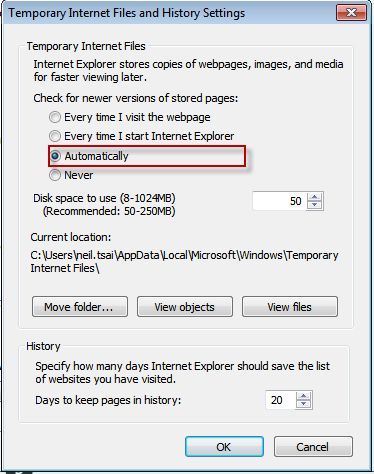
這是個很簡單的產生Guidd語法,當IE8瀏覽器設定如下時:

則會發生Guid不會改變的情況,如下圖


解決方式:

Client端設定,不是個好方法。
比較好的解決 Server 端處理加入除清Cache語法,這樣就不會有Cache的問題囉


protected void Page_Load(object sender, EventArgs e)
{
    Response.Cache.SetNoStore(); //清除Cache
    Response.Write(Guid.NewGuid().ToString() );
}

Read more...