Visual Studio Code 常用快速鍵

2017年11月19日 星期日

Visual Studio Code 快速鍵
Shift+alt+f=foramt文件格式
Ctrl+d+d=快速選上相同字詞
Alt+滑鼠左鍵=可以連續選中不同位置,同時一起變更
Ctrl+b=快速把左邊視窗打開或收起來
Ctrl+p=快速跳到某個檔案
Shift+ctrl+o=快速跳出屬性和方法
Alt+前或後=類似vs裡面的往前或往後的箭頭
Alt+j=快速跳出intellisense,這是有吃我設定的才會生效,因為我有改掉快速鍵
F1=跳出快速選單,很多外掛相關字會在這裡面
Ctrl+alt+c=快速跳出command line
Ctrl+k+o=快速打開目前目錄的資料夾
Alt+上或下=可以快速把此行搬到上一行或下一行
SC快速鍵,加入框架
Ctrl + ENter快速換行


常用Visual Studio 快速鍵
Ctrl + M + Spec : 快速排版
Alt + 上/下:移動換行
Ctrl + Shift + U : 轉大寫
Ctrl + [ + s :快速跳至檔案

Read more...

git Http 501 錯誤處理

2017年11月3日 星期五

新開一個bratch要push時發生錯誤,訊息如下:HTTP 501 curl 22 Recv failure: Connection was aborted


google一下發現原來Post有限制1MB的限制
文章如下:
Maximum size in bytes of the buffer used by smart HTTP transports when POSTing data to the remote system. For requests larger than this buffer size, HTTP/1.1 and Transfer-Encoding: chunked is used to avoid creating a massive pack file locally. Default is 1 MiB, which is sufficient for most requests.


文章如下:https://www.kernel.org/pub/software/scm/git/docs/git-config.html


解法如下: 增加postbuffer空間即可,可用以下語法增加
git config --global http.postBuffer 157286400
參考網址:
https://confluence.atlassian.com/stashkb/git-push-fails-fatal-the-remote-end-hung-up-unexpectedly-282988530.html

Read more...

npm proxy設定

2017年10月24日 星期二

因為公司電腦要透過proxy才能出去,在使用npm套件管理時若沒設定proxy會出現407 Proxy Authentication Required錯誤訊息


我們可以開啟這檔案c:\users\xxx\.npmrc


輸入以下設定即可

https-proxy=http://username:password@proxy.xxxx.com:port/
proxy=http://username:password@proxy.xxxx.com:port

Read more...

Lazy 性能優化,實現延遲初始化

2017年4月13日 星期四

.Net 4.0中推出Lazy來實現延遲初始化以達到性能優化的目的
例如:建立某個物件時需要很多資源,但是在系統運行中不一定會把上用到
這時就可透過延遲初始化來達到目的,可以提高程式效率以更節省資源。

以下透過範例來說明:


執行結果

由上範例可以知道,剛開始時並沒有執行初始化,而是到car.Value.Name時才真正去載入。


參考來源:http://www.cnblogs.com/yunfeifei/p/3907726.html

Read more...

設定自動與內部主機時間同步,使用net time指令

2017年2月12日 星期日

當公司有些主機無法對外連線,所以無法使用與外部同步的服務,可以使用此語法,讓內部主機可以同步

例:
可對外主機 192.168.1.11 (A機器)
不同對外主機 192.168.1.12(B機器)

此時可在B機器操作以下方式
1.開啟命令提示字元
2.使用net use 指令跟A機器建立連線 => net use \\192.168.1.11
3.輸入使用者名稱與密碼
4執行net time \\192.168.1.11 /set /y


也可寫成批次檔,如下內容:
net use \\IP或主機名稱 密碼 /user:使用者名稱 --->連線對時主機
net time \\IP或主機名稱 /set /y --->校正時間
net use \\IP或主機名稱 /del --->中斷連線


參考來源:http://ithelp.ithome.com.tw/articles/10174201

Read more...

yield

2017年1月9日 星期一

yield,它可以讓程式員以傳回每個元素的方式來自動產生IEnumerable<T>物件

例如下列程式會回傳1-5 五個數字的IEnumerable<T>物件:

這是一般的寫法,因為List<T>有實作IEnumerable<T>,所以很自然的會用List<T>作為產製IEnumerable<T>的寫法。

        static IEnumerable<int> GetCollection1()
        {
            List<int> list = new List<int>();
            for (int i = 1; i <= 5; i++)
            {
                list.Add(i);
            }
            return list;
        }

改為yield寫法,看起來更為精簡,yield指令會告訴編譯器,這一段函式的回傳值IEnumerable<T>內的元素由yield return所回傳的物件來填充,因此可省下額外使用集合物件事先封裝的工作。

  
        static IEnumerable<int> GetCollection2()
        {
            for (int i = 1; i <= 5; i++)
            {
                yield return i;
            }
        }


比較二個方式的效能

    private static int testMax = 5000000;
    static void Main(string[] args)
    {

        Stopwatch sw = new Stopwatch();
        sw.Start();
        var result = GetCollection1();
        sw.Stop();
        Console.WriteLine("Collection1:{0},count:{1}", sw.ElapsedMilliseconds, result.Count());

        sw.Restart();
        var result2 = GetCollection2();
        sw.Stop();
        Console.WriteLine("Collection2:{0},count:{1}", sw.ElapsedMilliseconds, result2.Count());

        sw.Restart();
        var result4 = GetCollection4();
        sw.Stop();
        Console.WriteLine("Collection4:{0},count:{1}", sw.ElapsedMilliseconds, result4.Count());

	sw.Restart();
        var result5 = GetCollection5();
        sw.Stop();
        Console.WriteLine("Collection5:{0},count:{1}", sw.ElapsedMilliseconds, result5.Count());

    }

    static IEnumerable<int> GetCollection1()
    {
        List<int> list = new List<int>();
        for (int i = 1; i <= testMax; i++)
        {
            list.Add(i);
        }
        return list;
    }

    static IEnumerable<int> GetCollection2()
    {
        for (int i = 1; i <= testMax; i++)
        {
            yield return i;
        }
    }
    
    static IEnumerable<Student> GetCollection4()
    {
        for (int i = 1; i <= testMax; i++)
        {
            yield return  new Student()
            {
                Id = i,
                Name = i.ToString()
            };
        }
    }

    static IEnumerable<Student> GetCollection5()
    {

        List<Student> studentList = new List<Student>();
        for (int i = 1; i <= testMax; i++)
        {
            studentList.Add(new Student() {Id=i,Name=i.ToString() });
        }
        return studentList;
    }
    
    public class Student
    {
        public int Id { get; set; }

        public string Name { get; set; }
    }


執行結果,我們發現使用yield寫法,所執行時間為0,這是因為延遲查詢,當我們對這個集合查詢時才會真正載入資料。

image


//查詢階段才會真正載入資料
Console.WriteLine(result4.Where(o => o.Id == 700).Select(o => o.Name).FirstOrDefault());


若是在foreach這類迭代運算中要中斷執行,則可利用yield break來中斷,如下程式碼:

    static IEnumerable<int> GetCollection3(IEnumerable<int> NumberSeries)
    {
        foreach (var number in NumberSeries)
        {
            if (number > 10)
            {
                yield break;
            }
            else
            {
                yield return number;
            }
        }
    }

執行結果

image

Read more...

C# 6.0 筆記

2016年12月7日 星期三

C# 6.0使用roslyn編譯器,而roslyn是被內建在VS2015,雖然VS2013可透過Nuget安裝”Microsoft.Net.Compilers”來使用C#6.0,但是不知道會不會有未知問題,所以還是建議使用VS2015來寫比較好。


1.Auto property enhancements (自動屬性初始化)

    class Student
    {
        public string Name { get; set; } = "Neil";

        public string Id { get; set; } = "A001";

        public DateTime DateCreated { get; private set; } = DateTime.Now;
    }


2.Expression-bodied funtion(成員使用lambda運算式)

    class Student
    {
        public string Name { get; set; } = "Neil";

        public string Id { get; set; } = "A001";

        public DateTime DateCreated { get; private set; } = DateTime.Now;

        //C# 6.0新增寫法
        public string GetStudentInfoNew => string.Format("Name:{0},Id:{1}", Name, Id);

        //一般寫法
        public string GetStudentInfoOld()
        {
            return string.Format("Name:{0},Id:{1}", Name, Id);
        }
    }


3.Using Static(使用Using 靜態命合類別)

using static System.String;//使用using static將string載入

namespace Csharp567
{
    public class Sample
    {
        public bool CheckIsNullNew(string val)
        {
            //不用string就可以直接使用IsNullOrEmpty方法
            return IsNullOrEmpty(val);
        }

        public bool CheckIsNullOld(string val)
        {
            return string.IsNullOrEmpty(val);
        }
    }
}


4.Null conditional operators(Null條件運算子)

public void GetStudentName()
{
    List<Student> students = null;
    students = new List<Student>() { new Student() { Name = "Neil", Id = "001" } };

    //新寫法
    if (students?[0]?.Name != null)
    {
        Console.WriteLine(string.Format("Name:{0}", students[0].Name));
    }

    //舊寫法
    if (students != null && students[0] != null && students[0].Name != null)
    {
        Console.WriteLine(string.Format("Name:{0}", students[0].Name));
    }
}


5.String interpolation(字串插補)

public void ShowString()
{
    string name = "Neil";
    int id = 1;
    //舊寫法
    string oldStr= string.Format("Name:{0},Id:{1}", Name, Id);
    //新寫法
    string newStr = $"Name:{Name},Id:{Id}";
}


6.nameof expressions(nameof運算子)

public void ShowStudentId()
{
    int studentId = 123;
    //用vs工具改名稱會一起更改
    string str = $"MethodName:{nameof(ShowStudentId)} ,{nameof(studentId)}:{studentId} Show Success!!";
    //result => ShowStudentId , studentId:123 Show Success!!
}


7.Index initializers(索引初始設定)

var studentsOld = new Dictionary<int, string>
{
    {1,"Neil" },
    {2,"Jeremy" }
};

var studentNew = new Dictionary<int, string>
{
    [1] = "Neil",
    [2] = "Jeremy"
};


8.Exception filters(例外過濾)

try
{
    var r = 0;
    r = 0 / 0;
}
catch (Exception ex) when (ex.Message.Contains("KeyeError")) //可filter自訂義條件
{

    Console.WriteLine($"msg: {ex.Message}");
}

Read more...

const vs readonly

2016年11月26日 星期六


1.const的常數是在編譯時期將所有使用到的地方替換成實際的數值(效能較好)


2.readonly是在實際執行期間才會去查找(靈活性高),可當做執行階段當數使用

例:public static readonly uint timeStamp = (uint)DateTime.Now.Ticks;


3.const的常數不能同時是static


4.readonly不能在method中使用


5.readonly可以在建構式裡給初始值


2016-11-26 下午 10-35-12


利用ILSpy反編譯工具查看編譯出來的dll

2016-11-26 下午 10-35-50


public class ReadOnlyTest
  {
     class SampleClass
     {
        public int x;
        // Initialize a readonly field
        public readonly int y = 25;
        public readonly int z;

        public SampleClass()
        {
           // Initialize a readonly instance field
           z = 24;
        }

        public SampleClass(int p1, int p2, int p3)
        {
           x = p1;
           y = p2;
           z = p3;
        }
     }

     static void Main()
     {
        SampleClass p1 = new SampleClass(11, 21, 32);   // OK
        Console.WriteLine("p1: x={0}, y={1}, z={2}", p1.x, p1.y, p1.z);
        SampleClass p2 = new SampleClass();
        p2.x = 55;   // OK
	//p2.y = 10; //因為不是在建構函數給值所以會出錯
	//錯誤訊息:無法指定唯讀欄位(除非在建構函數或變數初始設定式)
        Console.WriteLine("p2: x={0}, y={1}, z={2}", p2.x, p2.y, p2.z);
     }
  }
  /*
   Output:
      p1: x=11, y=21, z=32
      p2: x=55, y=25, z=24
  */


參考來源:

https://dotblogs.com.tw/yc421206/archive/2011/06/06/27232.aspx

http://slmtsite.blogspot.tw/2016/10/c-36-constant.html

https://msdn.microsoft.com/zh-tw/library/e6w8fe1b.aspx

https://msdn.microsoft.com/zh-tw/library/acdd6hb7.aspx

Read more...

String Pool

2016年11月22日 星期二


string pool簡單說就是一個Hash Table ,其中Key值是字串內容,Value是物件實體位置。

內容值會在程式編譯時期做初始設定,將程式碼中用到的用串加入,所以不同字串變數存放的靜態字串,

若是一樣的字串,字串會在編輯時期加入String Pool,透過String Pool的協助兩個變數會指到相同的物件實體。


一般的字串比對底層是以Byte為基礎的方式去比對,當比對的字串很長時,整個處理效能就跟著低落,若是可以善用

string pool,我們只需比對兩者是否指到相同的物件實體就可以了,可以獲得較佳的效能。

參考Larry大的文章,用ReferenceEquals效能是較好的。


2016-11-22 下午 11-29-52

執行結果

2016-11-22 下午 11-30-24


2016-11-22 下午 11-31-26

執行結果

2016-11-22 下午 11-32-18

2016-11-22 下午 11-34-13

執行結果

2016-11-22 下午 11-34-25


參考:https://dotblogs.com.tw/larrynung/archive/2011/06/30/30763.aspx

Read more...

TDD 安裝軟體準備事項

2016年5月23日 星期一


1.Visual Studio 2013
社群版下載位址
http://go.microsoft.com/fwlink/? LinkId=517284

2.VS套件
a.Specflow Visual Studio Extension – VS2013
https://visualstudiogallery.msdn.microsoft.com/90ac3587-7466-4155-b591-2cd4cc4401bc

b.Unit Test Generator
https://visualstudiogallery.msdn.microsoft.com/45208924-e7b0-45df-8cff-165b505a38d7
c.CodeMaid
https://visualstudiogallery.msdn.microsoft.com/76293c4d-8c16-4f4a-aee6-21f83a571496
3.NuGet 套件

  • Specflow
  • NSubstitute
  • Selenium WebDriver
  • Selenium WebDriver Support Classes
  • FluentAutomation
  • ExpectedObjects
  • Pickles.CommandLine


4.SQL
Visual Studio 2013以上版本內建localDB功能
說明 :https://msdn.microsoft.com/zh-tw/library/Hh510202(v=SQL.120).aspx

5.Fire Fox外掛
  • 因測試需要,建議您一定要安裝 Firefox 瀏覽器,並且安裝 Selenium IDE
6.Chocolatey
安裝套件

Read more...

TDD實務開發筆記

什麼是Unit Test

  1. 最小的測試單位
    粒度最小,以class來說指的是一個方法,
  2. 外部相依為零
    不應該與network、file、class相依
  3. 不具備商業邏輯
    不會有if else 之類的判斷
  4. 測試案例之間相依性為零
    這樣才可以精準的測試出哪個地方有問題
  5. 一個測試案例只測一件事
    不能跟其它案例有相依性,會影響測試結果

Unit Test 特性:First

  1. Fast:
    建議需低於500亳秒,高於1秒需要檢查是否有哪裡有問題,第一次起Test可能需要較久時間可排除
    若時間拉太長會影響開發節奏,讓開發速度變慢
  2. Independent:
    獨立性,不應該跟其它測試有相依性
  3. Repeatable:
    確保每次執行結果都一樣(在不改Code情況下)
  4. Self-validating:
    自我驗證,測試完後即可馬上看到結果,不需要經過query db或是查看檔案
  5. Timely:
    時效,通常都會開發好與測試的code一起commit,若不馬上做則會有偷懶的行為發生

3A原則

1. arrage
  • 初始化目標物件
  • 初始化方法參數
  • 建立模擬物件行為
  • 設定環境變數期望結果
2.act
  • 實際呼叫測試目標物件的方法
3.assert
  • 驗證目標物件是否如同預期運作


範例:

如果驗證以下的方法
public class MyCalculator
{
    public int Add(int first, int second)
    {
        return first + second;
    }
}


解法:


//先想好自已的Scenario
//例:傳入first:1,second:2,最後回傳值一定是3
[TestMethod()]
public void AddTest_First_1_Second_2_Should_be_3()
{
    //3A原則
    //arrange
    var target = new MyCalculator();
    var first = 1;
    var second = 2;
    var excepted = 3;

    //act
    var actual = target.Add(first, second);

    //assert
    Assert.AreEqual(excepted, actual);
    
}


Ms Test 相關簡介


Test 標記


  • Test Class :測試類別


  • Test Method:測試方法


驗證:


  • Assert(基本驗證):預期expected是否等是實際actual


  • CollectionAssert(集合驗證 ):一般陣列的驗證,好處不用用迴圈來一個一個驗證


  • ExceptedException(例外驗證):不能用try catch,所以要用專屬的驗證方式


Hook


  • ClassInitialize:每個測試類別開始前跑一次


  • ClassCleanup:每個測試類別結束前跑一次


  • TestInitialize:每個測試開始前跑一次


  • TestCleanup:每個測試結束後跑一次


  • AssemblyInitialize:整個測試專案開始前跑一次


  • AssemblyCleanup:整個測試專案結束後跑一次


  • TestContext:用WriteLine()即可印出


測試相關Attribute


  • TestCategory(assert excetipn) ==>分類tag


  • Ignore==>略過此測試方法


熱鍵


Ctrl+R+T:執行單一測試


Ctrl+R,Ctrl+T:偵錯單一測試


Ctrl+R+A:執行所有測試


Ctrl+R,Ctrl+A:偵錯所有測試

Read more...

自訂錯誤Exception

2016年5月19日 星期四


在處理Exception時,有很多種處理方式,這篇來講解的是自訂的Exception處理方法

應用情境:處理商業邏輯時,可以使用來自訂義錯誤的訊息。


初學者剛開始的寫法會是(圖一),自已throw 出exception,但是這樣會遇到,如果程式也發生錯誤的話會抓不到問題如圖二

而自訂義的錯誤則可以把二個行為分開,這樣可以確認到底是商業邏輯有問題,還是資料有問題(圖三、圖四)


其它有想到在來補充吧

1

(圖一)

2

(圖二)

3

(圖三)

4

(圖四)


參考來源:https://msdn.microsoft.com/zh-tw/library/ms229064.aspx

Read more...

用Oracle 使用TransactionScope錯誤訊息

2016年5月5日 星期四


在使用TransactionScope,要特別注意是否有安裝以下元件,不然會有以下錯誤訊息:
Exception type: System.InvalidOperationException
Message: The Promote method returned an invalid value for the distributed transaction.

需要檢查


原來是Oracle要安裝OracleMTSRecoveryService才可以使用。

Read more...

dateObj.getYear() vs dateObj.getFullYear()

2016年3月10日 星期四


今天遇到一個特別的情況,所以筆記一下

用Javascript的.getYear(),取出得到的是115

原來因為2000年的問題,getYear()只會回傳二位數,所以現在早就不能用了,要改用getFullYear()


參考來源:https://developer.mozilla.org/en-US/docs/Web/JavaScript/Reference/Global_Objects/Date/getYear

Read more...

利用swagger建立互動式API文件

2015年12月28日 星期一

最近在寫Web API程式,通常都會搭配Help Page來使用,可以建立文件方便查詢,但是如果要測試API,則都會使用Fiddle或是PostMan來做測試,同事有介紹我一套叫Swagger的套件,它不只能產生文件,也可以在網頁上直接測試,是不是超棒的,以下是記錄我安裝的過程以及使用方法,我是用新專案來做範例


1.建立新專案
2.選擇Web API
3.使用NuGet來下載Swagger套件


4.安裝完成後,在專案上按右鍵,選擇屬性

5.選擇產生文件要放置的地方

6.開啟App_Start\SwaggerConfig.cs,打開註解處

7.實作GetXmlCommentsPath()方法

8.測試時,只要執行網站並在後面輸入\swagger即可開始頁面

9.可直接展開方法,並做測試,執行後可看到結果


以上就是基本的swagger套件使用方式。
最後附近github位址:https://github.com/domaindrivendev/Swashbuckle

Read more...

為Enum加入取得Description Extension方法

2015年12月22日 星期二

在使用Enum時,有時候需要定義說明文字以利在UI上呈現,所以可以加入屬性Description,於是在網路上找了一下,結果只有找到取得名稱的方式,如下所示
 
using System;

public class GetNameTest {
    enum Colors { Red, Green, Blue, Yellow };
    enum Styles { Plaid, Striped, Tartan, Corduroy };

    public static void Main() {
        Console.WriteLine("The 4th value of the Colors Enum is {0}", Enum.GetName(typeof(Colors), 3));
        Console.WriteLine("The 4th value of the Styles Enum is {0}", Enum.GetName(typeof(Styles), 3));
    }
}


來源:https://msdn.microsoft.com/zh-tw/library/system.enum.getname(v=vs.110).aspx


所以只好自已寫擴充方法來新增

 
public static class HelpExtensions
{
 public static string GetEnumDescription(this Enum value)
 {
  FieldInfo fi = value.GetType().GetField(value.ToString());

  DescriptionAttribute[] attributes = (DescriptionAttribute[])fi.GetCustomAttributes(typeof(DescriptionAttribute), false);
  //若取不到屬性,則取名稱
  if ((attributes != null) && (attributes.Length > 0))
   return attributes[0].Description;
  else
   return value.ToString();
 }
}

public enum MessageType
{
    [Description("Create")]
    Creation = 1,
    [Description("Update")]
    Updating = 2,
    [Description("Del")]
    Deletion = 3,
    [Description("Select")]
    Selection = 4
}

//使用方式
var messageType = MessageType.Deletion.GetEnumDescription();
Console.WriteLine("Ouput:" + messageType);
//顯示結果
//Output:Del

Read more...

手動註冊window service程式

2015年10月6日 星期二

執行程式如下:


加入service方式
c:\Windows\Microsoft.NET\Framework\v4.0.30319\InstallUtil.exe C:\xxx\xxx.exe(執行程式名稱)

刪除service 
sc delete service名稱

Read more...

指令編譯C#

2015年8月5日 星期三

查詢指令

csc /help

編譯cs檔方式

C:\Windows\Microsoft.NET\Framework\v4.0.30319>csc /t:exe /out:c:\helloworld\hell
oworld.exe c:\helloworld\helloworld.cs


public class HelloWorld
{
    public static void Main(string[] args)
    {
        System.Console.WriteLine("Hello World!");
        System.Console.ReadLine();
    }
}

Read more...

Guid.NewGuid Enter Web Address is not work IE8

2015年7月12日 星期日

今天遇到使用Guid.NewGuid在IE8的奇怪問題
如果在網站列按Enter則會發生,但按F5重新整理確不會
最後確定是瀏覽器Cache問題造成的,我來重現一下實際的情況

測試程式如下:

 
protected void Page_Load(object sender, EventArgs e)
{
    Response.Write(Guid.NewGuid().ToString() );
}


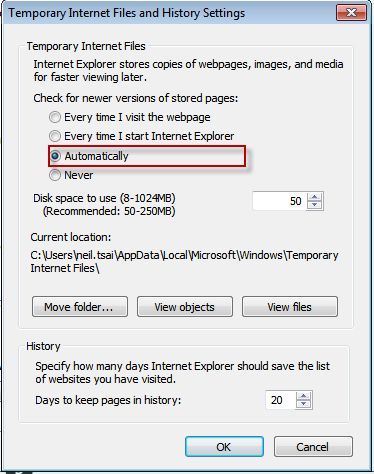
這是個很簡單的產生Guidd語法,當IE8瀏覽器設定如下時:

則會發生Guid不會改變的情況,如下圖


解決方式:

Client端設定,不是個好方法。
比較好的解決 Server 端處理加入除清Cache語法,這樣就不會有Cache的問題囉


protected void Page_Load(object sender, EventArgs e)
{
    Response.Cache.SetNoStore(); //清除Cache
    Response.Write(Guid.NewGuid().ToString() );
}

Read more...

site map 取得自訂屬性

2015年6月23日 星期二


public class SiteMapMenu : HierarchicalDataBoundControl
{
  public void RecursiveCreateChildControls(IHierarchicalEnumerable dataItems, bool isRecursiveCall)
  {
      //抓取自訂屬性
      System.Web.SiteMapNode node = dataItem.Item as System.Web.SiteMapNode;
      bool customerTag = node["coustomerFlag"];

      if(customerTag) continue;
  }

}

//Web.sitemap


參考:https://msdn.microsoft.com/zh-tw/library/system.web.sitemapnode(v=vs.110).aspx

Read more...